Floop Ess Hunter is a REAPER de-esser script designed to detect and control vocal sibilance by writing precise volume envelope reductions directly to media items.
Instead of processing audio destructively or relying on traditional de-esser plugins, the script performs analysis and applies transparent, editable envelope automation fully integrated into REAPER.
This approach keeps the original audio intact while giving you visual and manual control over every detected sibilant segment.
What Is Floop Ess Hunter, a REAPER De-Esser Script?
Floop Ess Hunter is a REAPER de-esser script that analyzes vocal material to identify sibilant consonants such as “s”, “sh”, and “ch”.
The script detects sibilance using spectral analysis and zero-crossing information, then writes non-cumulative volume envelope segments only where needed.
All edits remain editable, adjustable, and reversible using standard REAPER workflows.
Update: Ess Hunter has been integrated into Floop Hunter Framework, a more advanced REAPER vocal cleanup script that also detects plosives and breaths. For new projects, consider using the updated version.
How Sibilance Detection Works
Floop Ess Hunter combines multiple analysis stages:
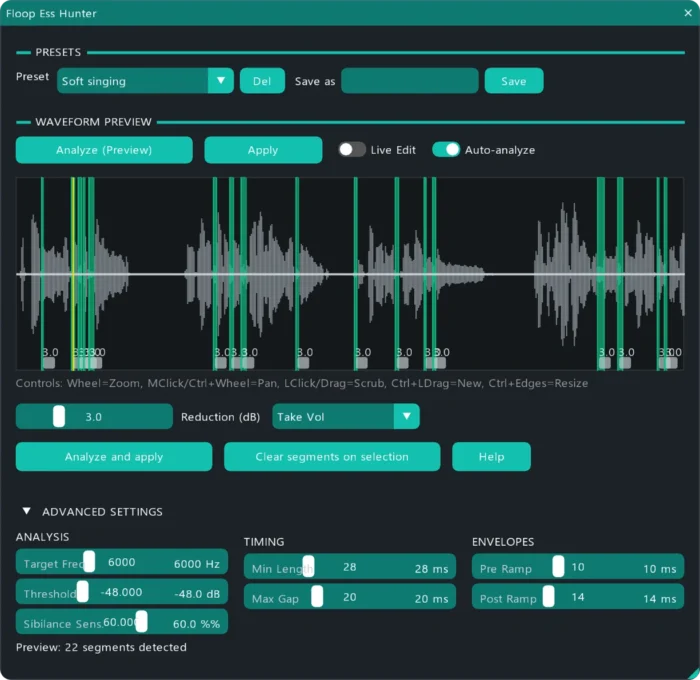
- Zero-allocation HPF (Butterworth) engine with a default 6000 Hz cutoff
- adaptive thresholding based on spectral ratios
- ZCR (Zero Crossing Rate) detection for fricatives
- segment merging and hysteresis to avoid chattering
This allows the script to focus on actual sibilant energy instead of broadband brightness.
If you have questions, issues, or suggestions, YouTube comments are currently the easiest way for me to collect feedback and improve the script over time.
Key Features of the REAPER De-Esser Script
Targeted Envelope-Based De-Essing
Writes volume envelope points only on detected sibilant segments, without affecting the rest of the signal.
Multi-Envelope Support (Track, Pre-FX, and Take)
Supports Track Volume, Pre-FX Volume (recommended), and Take Volume envelopes. Visual alignment and gain factors automatically adapt to track envelope scaling modes (Fader/Amplitude).
Non-Cumulative Editing
Segments are replaced, not stacked, allowing safe re-analysis and fine-tuning.
Interactive Visual Preview
Zoom, pan, and adjust detected segments directly in the preview window, including draggable edges and per-segment gain control.
Built-In Presets
Optimized presets for:
- Speech
- Soft Singing
- Aggressive Singing
- User Custom Presets
Safe Editing Workflow
Automatic undo blocks wrap all apply and clear operations.
Asynchronous Processing
Analysis runs fully asynchronously on a background thread, preventing UI freezes on long audio items and providing a real-time progress bar.
Who Is Floop Ess Hunter For?
- mixing engineers working on vocal-heavy sessions
- post-production editors dealing with dialogue cleanup
- REAPER users who prefer visual, editable automation over black-box processing
Why Use a REAPER De-Esser Script with Envelope Automation?
Traditional de-essers act as dynamic processors that continuously affect the signal.
Envelope-based de-essing allows you to:
- See exactly where sibilance occurs
- Fine-tune reduction per segment
- Avoid over-processing
- Keep full control during revisions
Floop Ess Hunter integrates naturally into REAPER’s editing model.
Requirements
- REAPER v7.5x or later
- ReaImGui (ReaScript binding for Dear ImGui, minimum 0.10.2+)
- SWS/S&M Extension
Tested on Windows 10 / 11.
Designed with cross-platform compatibility in mind.
Installation via ReaPack
The recommended installation method is ReaPack.
- Open REAPER
- Go to Extensions → ReaPack → Import Repositories
- Add the Floop repository
- Open Extensions → ReaPack → Browse Packages
- Search for Floop Ess Hunter
- Install and Apply
You can optionally assign a keyboard shortcut or toolbar button.
Quick Start
- Select one or more vocal items
- Run Floop Ess Hunter from the Actions List
- Click Analyze and apply
- Adjust parameters in Advanced Settings if needed
Use "Clear segments on selection" to quickly remove written automation segments.
All parameters are documented in the built-in Help window.
REAPER de-esser script – Frequently Asked Questions
Is this REAPER de-esser script destructive?
No. The script does not modify audio files. It only writes volume envelope automation.
Does it work like a traditional de-esser plugin?
No. It performs offline analysis and applies envelope edits instead of real-time dynamic processing.
Can I edit the detected sibilance manually?
Yes. All segments can be resized, moved, or adjusted directly after analysis.
Which envelopes does it support??
It supports Track Volume, Pre-FX Volume (recommended), and Take Volume envelopes. For Take Volume envelopes, the script automatically corrects start offsets and playrate calculations to guarantee perfect point alignment even on trimmed media items.
Can I re-run the analysis safely?
Yes. The script replaces existing segments instead of stacking them.
Is it suitable for dialogue and voice-over work?
Yes. Presets and parameters are designed to handle speech and sung vocals.
Does it work on macOS and Linux?
The script is designed using cross-platform APIs. Development and testing have focused primarily on Windows.
The project is hosted on GitHub, where the source code and manual installation files are maintained.