Floop Key & BPM Sniffer is a REAPER audio key finder and tempo analysis script designed to quickly detect the musical Key, scale type, and Tempo (BPM) of your audio items. The utility processes audio files natively on your arrangement timeline, eliminating the need for external detection applications or manual pitch verification. Built with a responsive ReaImGui interface, the script automatically reads your active REAPER theme colors to ensure visual integration with your layout.
Key Features – REAPER Audio Key Finder
- Dual-Resolution Engine: Analyzes audio in 1024-sample blocks for precise transient BPM tracking, while accumulating data into 16384-sample blocks for high-resolution tonal analysis.
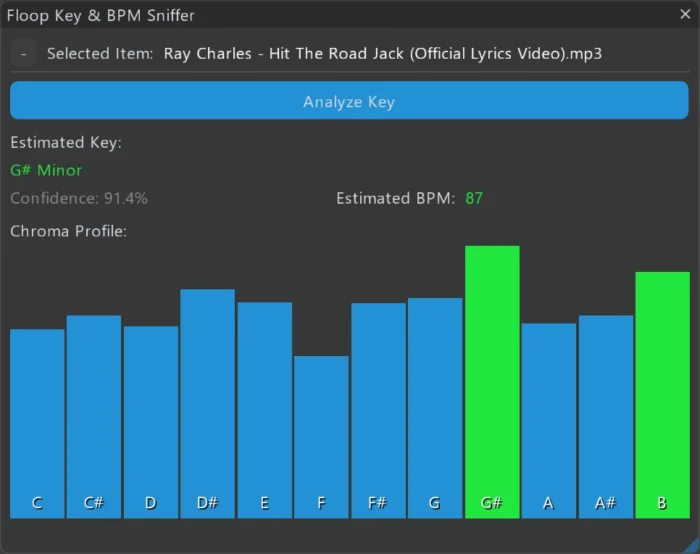
- Key Detection (Chromagram): Profiles energy distribution across the 12 chromatic steps to identify the root note and scale (Major or Minor).
- Tempo Tracking: Computes exact BPM via Spectral Flux and autocorrelation algorithms, including an internal weighting system to handle live timing variations or tape drift.
- Dynamic Theme Adaptation: Procedurally reads the active REAPER theme luminance and color settings to generate an accessible, non-clashing UI palette.
- Mini & Full Layout Modes: Toggles between a compact, unobtrusive floating widget for essential data and a detailed visual display showing the note-energy distribution chart.
- Smart Docking: Supports native REAPER docking layouts without causing graphical interface glitches.
Technical Implementation
The script executes processing logic by reading selected audio item data in a single optimized CPU pass. For BPM calculation, it utilizes Spectral Flux to isolate rhythmic onset markers. For tonal profiling, it relies on Fast Fourier Transform (FFT) data compiled into a Chromagram.
A core technical component is the native UI integration layer. Instead of relying on hardcoded graphical values that clash with diverse user setups, the script queries REAPER’s theme configuration directly upon launch. The system measures the brightness and contrast thresholds of the DAW theme, adjusting the text, window backgrounds, and chart borders procedurally.
In Full Mode, the user interface renders an elastic, borderless Chroma Profile chart. This visualization highlights the dominant detected pitch center in green and secondary harmonic notes in blue, allowing you to inspect the musical energy distribution. The text layout includes automatic truncation to handle long audio file paths and item labels without breaking the UI bounding box.
Compatibility
- REAPER Version: v7.0 or newer.
- Operating Systems: Fully supported on Windows. Designed with cross-platform REAPER APIs for macOS and Linux compatibility.
Requirements
- REAPER DAW (v7.6x+)
- ReaImGui extension (Minimum version 0.10.2+ required via ReaPack to prevent script termination)
Installation
Installation via ReaPack
Requirements:
- REAPER v7.6x or later
- ReaImGui (minimum version 0.10.2+)
- SWS/S&M Extension
Install via ReaPack:
- Open REAPER
- Go to Extensions → ReaPack → Import Repositories…
- Add the Floop repository
- Open Extensions → ReaPack → Browse Packages
- Search for “Floop Scratchpad”
- Install and Apply
Advanced users can manually install the script from the GitHub Release page.
Algorithmic Expectations & Best Practices
- Open REAPER.
- Navigate to Extensions → ReaPack → Browse Packages.
- Locate and install
ReaScript binding for Dear ImGui. Restart REAPER if this is a new installation. - Go to Extensions → ReaPack → Import Repositories…
- Input the following repository URL:
[https://github.com/floop-s/floops-reaper-scripts/raw/main/index.xml](https://github.com/floop-s/floops-reaper-scripts/raw/main/index.xml) - Click OK, return to Browse Packages, search for
Floop Key & BPM Sniffer, right-click to install, and press Apply.
While the Dual-Resolution engine provides accurate structural measurements for most standard audio items, this utility functions as an algorithmic tool rather than an absolute musical interpreter.
- Tonal Complexities: Polyphonic arrangements, highly distorted samples, or sub-bass frequencies can alter the energy balance within the Chromagram distribution.
- Transient Tracking: Tracks without definitive acoustic transients, extreme rubato performances, or historical tape drift will display a calculated mathematical average rather than a rigid grid value.
The output generated by the script serves as a highly reliable starting point. However, the final result should always be verified by your own ears.
REAPER audio key finder FAQ
Q: Does the script require manual configuration when switching REAPER themes?
A: No. The dynamic theme engine executes automatically during the script initialization layer. If you switch your REAPER theme, restarting the interface will force the script to query the new DAW colors and rebuild the palette.
Q: Does this script support MIDI items?
A: No. This tool uses audio spectral analysis and requires raw PCM data from audio items to compute the Chromagram and Spectral Flux.
Q: Is the analysis destructive to my audio files?
A: No. The script only reads the audio item data. It does not alter, write to, or destructively change your source files or your REAPER project state.
Q: Why does the script show an average BPM instead of a fixed metronome value?
A: For live unquantized tracks or older analog recordings with notable tape speed variations, the engine calculates the mathematical average of the detected transient markers.
Q: Can I dock the interface to stay visible?
A: Yes. The script utilizes standard ReaImGui windows, which can be pinned or docked inside any native REAPER window dock layout.
Q: Does the script require manual configuration when switching REAPER themes?
A: No. The procedural theme engine executes automatically during the script initialization layer. If you switch your REAPER theme, restarting the interface will force the script to query the new DAW colors and rebuild the palette.
Source code, releases, and manual installation files are available on GitHub.