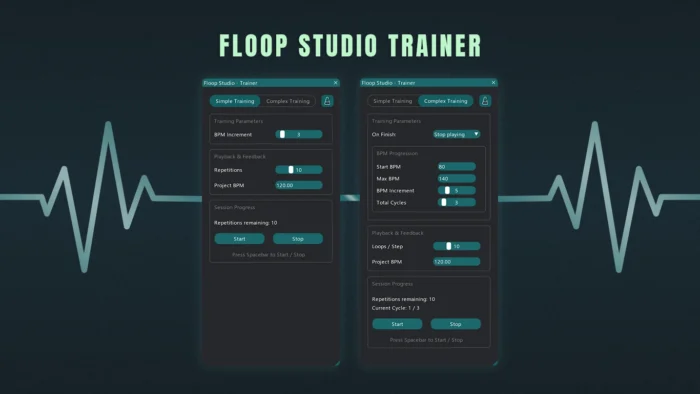
Floop Studio Trainer is a REAPER practice tool designed to automate tempo increases during practice sessions, allowing musicians to focus entirely on playing instead of managing the transport or BPM manually.
The script works directly inside REAPER and progressively increases the project tempo while looping a selected section. This makes it ideal for guitar practice, instrumental training, and timing exercises where gradual tempo progression is essential.
No external tools, no manual tempo changes, and no interruption during practice.
What Is Floop Studio Trainer for REAPER?
Floop Studio Trainer is a hands-free BPM training script that turns REAPER into an adaptive practice environment.
Instead of stopping playback to raise the tempo, the script automatically increases the project BPM after a defined number of loop repetitions. You select the section to practice, define how many cycles to repeat, and decide how much the BPM should increase each time.
Once started, the session runs autonomously.


If you have questions, issues, or suggestions, YouTube comments are currently the easiest way for me to collect feedback and improve the script over time.
How Floop Studio Trainer Works as a REAPER BPM Practice Trainer
- Open REAPER and load your project
- Create a time selection on the timeline
- Enable Repeat in the transport
- Launch Floop Studio Trainer
- Select Training Mode (Simple or Complex).
- Set:
- Number of repetitions
- BPM increase per cycle
- target ranges
- Press Start and begin practicing
The script automatically raises the BPM after each completed loop cycle.
Key Features of the REAPER BPM Practice Trainer
Hands-Free BPM Automation
Automatically increases project tempo after a defined number of repetitions, without stopping playback.
Dual Training Modes
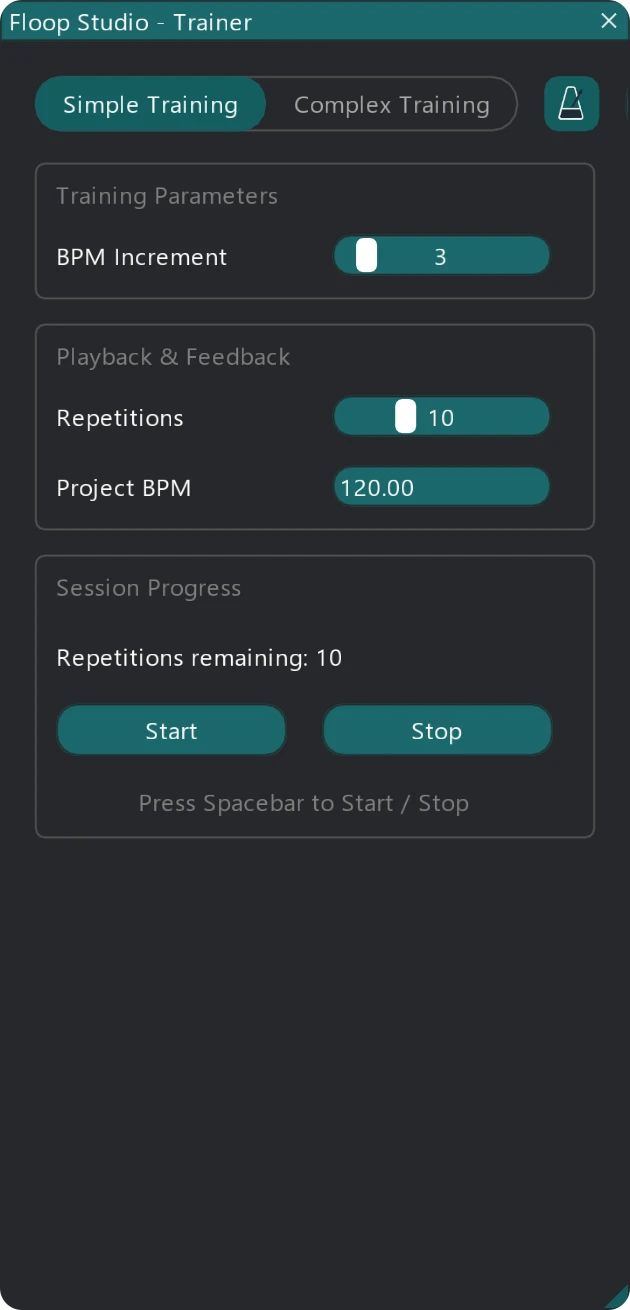
- Simple Training Mode: fixed repetition cycles with incremental BPM increases.
- Complex Training Mode: structured BPM ranges with Start BPM, Max BPM, cycle repetition, and configurable end behavior
Progressive Tempo Training
Ideal for building speed gradually while maintaining timing accuracy.
Built-In Cycle Counter
Displays remaining repetitions before the next BPM increase.
Metronome and Audio Support
Works with:
- REAPER’s built-in metronome
- A custom click track
- Any audio or instrument track
Integrated Metronome Control (v1.3): Toggle REAPER’s built-in metronome directly from the script interface via a custom interactive icon.
Synchronization Safety (v1.3): Includes in-app help documentation to ensure correct Timebase settings for audio track stretching.
Safe BPM Restoration
Optionally restores the original project BPM when the script closes (with improved undo handling and robust loop restart in v1.3).
ReaImGui-Based Interface
Clean, responsive UI featuring Framed Groups and dynamic resizing designed to stay out of the way during practice.
Important: To prevent synchronization issues with audio items, ensure that either the Project Timebase or the Track Timebase (containing the audio) is set to ‘Beats (position, length, rate)’.
Optional (Recommended): If you want a count-in before playback starts, open Metronome Settings in REAPER and enable Count-in before playback and Metronome enabled during playback.
Technical Implementation & Parameters
The script relies on REAPER’s native transport and tempo map APIs combined with ReaImGui for the graphical layer.
- Simple Mode: Continuous progression. The tempo increases by the designated BPM increment indefinitely until stopped.
- Complex Mode: Finite progression. You define a Start BPM, Max BPM, BPM Increment, and Total Cycles.
- On Finish Actions: When the progression reaches the Max BPM, you can configure the script to either: Stop playing, Restart from Start BPM, or Keep playing at Max BPM.
Typical Use Cases in REAPER
- Guitar speed and accuracy training
- Instrument warm-up routines
- Practicing difficult passages at increasing tempos
- Timing and rhythmic precision exercises
- Loop-based rehearsal with audio backing tracks
Requirements
- REAPER v7.5x or later
- ReaImGui (ReaScript binding for Dear ImGui, minimum 0.10.2+)
Tested on Windows 10 / 11.
Designed with cross-platform compatibility in mind.
How to Install Floop Studio Trainer in REAPER
Installation via ReaPack (Recommended)
- Open REAPER
- Go to Extensions → ReaPack → Import Repositories
- Add the Floop repository
- Open Extensions → ReaPack → Browse Packages
- Search for Floop Studio Trainer
- Install and Apply
Optionally assign a keyboard shortcut or toolbar button.
Advanced users can manually install the script from the GitHub release page.
REAPER BPM Practice Trainer – Frequently Asked Questions
Is Floop Studio Trainer a metronome plugin?
No. It does not generate sound on its own. The script controls the project BPM and works with REAPER’s metronome, audio tracks, or custom click tracks. You can toggle the native metronome via the interface icon.
Does the script change my project permanently?
No. If BPM restoration is enabled, the script restores the original tempo when it closes.
Can I use audio tracks instead of the metronome?
Yes. The script works with any audio or instrument track, as long as the project or track timebase is set correctly.
Why does my audio speed not change with the BPM?
Ensure the project or track timebase is set to Beats (position, length, rate). This allows audio to follow tempo changes correctly.
Can I hear a count-in before the loop restarts? Yes, by enabling the native REAPER metronome count-in options within REAPER’s Metronome Settings
Is Floop Studio Trainer only for guitar practice?
No. While it is well-suited for guitar training, it works for any instrument or timing-based practice.
Does it work on macOS and Linux?
The script uses REAPER’s cross-platform APIs and ReaImGui. Development and testing have focused on Windows, but it should also work on macOS and Linux.
The project is hosted on GitHub, where the source code and manual installation files are maintained.