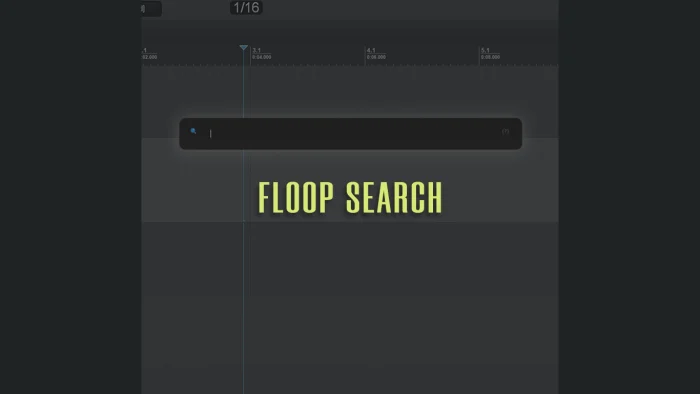
Floop Search is a REAPER track search and navigation script designed to speed up workflow in large and complex projects.
This REAPER Lua search tool introduces a floating search bar that lets you instantly locate tracks by name or track number, without breaking focus or touching the mouse.
The interface stays hidden until invoked, appears centered on screen, and reacts immediately to typing.
All interaction is keyboard-driven, making Floop Search ideal for fast editing, mixing, and post-production sessions where mouse-based navigation becomes inefficient.
While browsing results, tracks can be previewed using “temporary” solo, allowing you to quickly identify the correct sound before confirming a selection.
When the script closes, all previous project states – selection, solo, and track colors – are automatically restored.
Floop Search helps locate and audition tracks quickly in large REAPER projects.
What Is Floop Search for REAPER?
Floop Search is a REAPER script that adds a fast, keyboard-centric track search system directly inside the DAW.
Unlike manual scrolling or track manager workflows, Floop Search lets you:
- search tracks instantly
- preview results safely
- confirm selection without altering your project state
It behaves more like a command palette than a traditional browser, prioritizing speed, focus, and non-destructive navigation.

If you have questions, issues, or suggestions, YouTube comments are currently the easiest way for me to collect feedback and improve the script over time.
Key Features of REAPER Track Navigation – Floop Search
Floating Search Interface
A centered, floating search bar that appears only when needed and disappears instantly when closed.
Instant Track Filtering
Search tracks by:
- partial name
- full name
- track number
Results update in real time while typing.
Full Keyboard Navigation
Navigate results without touching the mouse:
- Arrow keys to move
- Enter to confirm
- Esc to cancel
Temporary Solo Preview
Preview the currently highlighted track using temporary solo while browsing results, without committing any changes.
Automatic State Restoration
When the script exits, Floop Search restores:
- previous track selection
- solo states
- track colors
No permanent changes are applied unless a selection is confirmed.
Clear Visual Feedback
Highlighted tracks use consistent visual cues for immediate identification.
Smart Focus Handling
The search field automatically captures keyboard input on launch, allowing instant typing without extra clicks.
Clean ReaImGui Interface
Modern, lightweight UI built with ReaImGui, optimized for responsiveness and clarity.
Typical Use Cases for this REAPER Track Navigation Floop Search
- Jumping instantly to a specific track in large sessions
- Auditioning tracks without losing the current selection
- Keyboard-centric workflows and shortcut-based navigation
- Mixing, sound design, and post-production projects with many tracks
Why Use a REAPER Track Navigation Script?
In complex projects, track navigation often becomes a bottleneck.
Floop Search helps you:
- eliminate manual scrolling
- avoid opening secondary managers
- keep your hands on the keyboard
- maintain focus during creative or technical work
For users who rely heavily on shortcuts and speed, Floop Search integrates naturally into an advanced REAPER workflow.
Requirements
- REAPER v7.5x or later
- ReaImGui (ReaScript binding for Dear ImGui, via ReaPack – minimum 0.10.2+)
- Lua (native REAPER scripting language)
Tested on: Windows 10 / 11
Designed with cross-platform compatibility in mind.
How to Install Floop Search in REAPER
The recommended installation method is ReaPack.
Installation via ReaPack
- Open REAPER
- Go to Extensions → ReaPack → Import Repositories
- Add the Floop repository
- Open Extensions → ReaPack → Browse Packages
- Search for “Floop Search”
- Install and Apply
Optionally, assign a keyboard shortcut or toolbar button for instant access.
Advanced users can manually install the script from the GitHub release page .
Frequently Asked Questions (FAQ)
Is Floop Search an audio processing plugin?
No. Floop Search is a navigation and workflow script. It does not process or modify audio.
Does Floop Search change my project permanently?
No. The script temporarily alters selection and solo states for navigation and preview purposes, then restores everything on exit.
Can I use Floop Search in huge projects?
Yes. Floop Search is specifically designed for large REAPER sessions with many tracks.
Does it support searching by track number?
Yes. You can locate tracks instantly by typing their track number.
Does Floop Search work without the mouse?
Yes. The entire workflow is keyboard-driven.
Does it work on macOS and Linux?
It should. The script uses standard Lua and ReaImGui APIs supported by REAPER on Windows, macOS, and Linux.
Development and testing have focused primarily on Windows.
The project is hosted on GitHub, where the source code and manual installation files are maintained.