Floopa Station is a REAPER live looping script designed for real-time performance and loop-based workflows directly inside the DAW.
It provides a self-contained looping environment with automatic alignment, visual timing feedback, and full MIDI/keyboard control, eliminating the need for external hardware or complex setup.
Just press Setup Floopa and start looping.
What Is Floopa Station?
Floopa Station turns REAPER into a fully featured live looper, suitable for real-time performance, rehearsal, sound design, and creative experimentation.
Unlike traditional loop workflows based on manual item editing, this REAPER live looping script manages track creation, loop length, alignment, fades, transport state, and visual feedback automatically, allowing you to focus on performance instead of DAW mechanics.

Key Features of the REAPER Live Looping Script
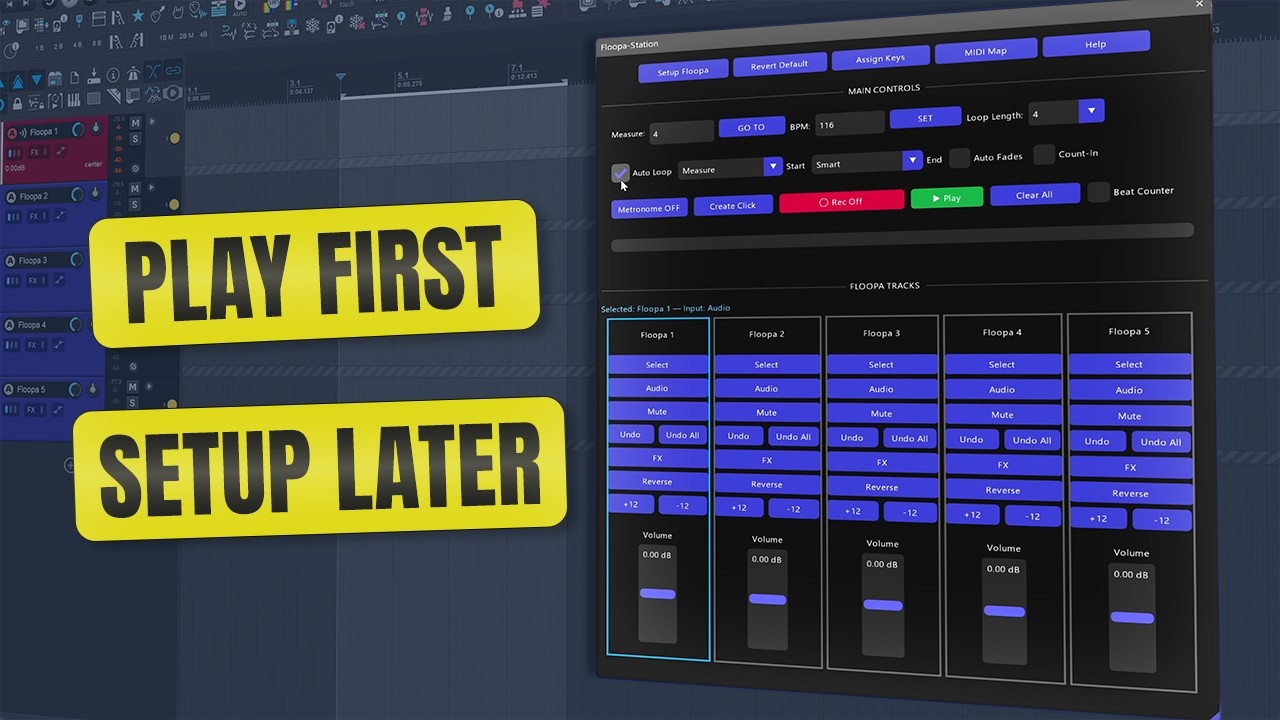
Five Dedicated Loop Tracks
Each track provides:
- Track Select
- Audio or MIDI input
- Mute
- Undo last take
- FX access
- Reverse playback
- Transpose ±12 semitones
Each loop track supports multiple takes/lanes, enabling layered performances and non-destructive experimentation.
Auto-Loop System (Timing Without Guesswork)
Floopa Station includes an Auto-Loop engine with:
- Start alignment
- End rounding
- Smart / Epsilon modes
The first recording pass defines loop length and alignment, regardless of timeline position; recording does not need to start at bar 1.
Micro-Fades for Seamless Loops
Configurable micro-fades smooth loop boundaries and prevent clicks:
- Duration: 0–500 ms
- Curve types: Linear, Exponential, Logarithmic
- Project-scoped via ExtState
Count-In and Visual Timing Feedback
For controlled recording and live performance:
- Optional Count-In before recording
- Beat Counter
- Loop Progress Bar
- Optional HUD for minimal stage setups
MIDI, Keyboard, and Transport Control
This REAPER live looper supports:
- Custom MIDI mapping (project-saved)
- Foot pedals and MIDI controllers
- Configurable keyboard shortcuts
- Integrated transport: Play, Pause, Record, Metronome, Repeat
Scalable ReaImGui Interface
The UI is built with ReaImGui and adapts to:
- Laptops
- High-resolution displays
- Live performance screens
Requirements
- REAPER v7.5x or later
- SWS/S&M Extension
- ReaImGui (ReaScript binding for Dear ImGui, via ReaPack)
- Windows 10/11 (tested)
How to Install Floopa Station in REAPER
The recommended installation method is ReaPack.
- Open REAPER
- Go to Extensions → ReaPack → Import Repositories
- Add the Floop repository
- Open Extensions → ReaPack → Browse Packages
- Search for “Floopa Station”
- Install and Apply
- (Optional) Assign shortcuts or toolbar buttons
Why Use a REAPER Live Looping Script?
Floopa Station is designed for users who want:
- Real-time looping without external hardware
- Predictable timing and loop alignment
- Visual feedback during performance
- Minimal setup inside REAPER
Note: To extract groove from recorded loops or transfer timing between audio and MIDI, see Floop Groove-A-Thor.
REAPER Live Looping Script – FAQ
Is Floopa Station an audio effect or plugin?
No. Floopa Station is a ReaScript-based live looping tool, not an audio effect or JSFX plugin.
Does it work in real-time live performance?
Yes. The script is designed for real-time use, including live looping, rehearsal, and performance scenarios.
Can I control Floopa Station with a MIDI foot controller?
Yes. The script supports custom MIDI mapping, saved per project, making it ideal for foot pedals and controllers.
Does it require starting at bar 1?
No. Auto-Loop works from any position on the timeline and handles alignment automatically.
Does it work on macOS and Linux?
The script is designed with cross-platform compatibility in mind and does not rely on platform-specific paths. However, development and testing have focused primarily on Windows.
Is external hardware required for this REAPER live looping script?
No. Floopa Station works entirely inside REAPER without external loop pedals or hardware devices.
The project is hosted on GitHub, where the source code and manual installation files are maintained.