Floop Groove-A-Thor is a REAPER groove extraction tool that captures timing and velocity patterns from audio and MIDI items and applies them to other material.
It allows you to transfer the rhythmic feel of one performance to another, keeping timing variations and groove intact across tracks.
The script supports groove transfer between different source and target types:
Audio → MIDI
MIDI → Audio
Audio → Audio
MIDI → MIDI
This workflow lets you reuse the timing feel of drum recordings, MIDI performances, or generated patterns across different tracks inside a REAPER project.
This approach goes beyond standard quantization by preserving groove variations instead of forcing strict grid alignment.
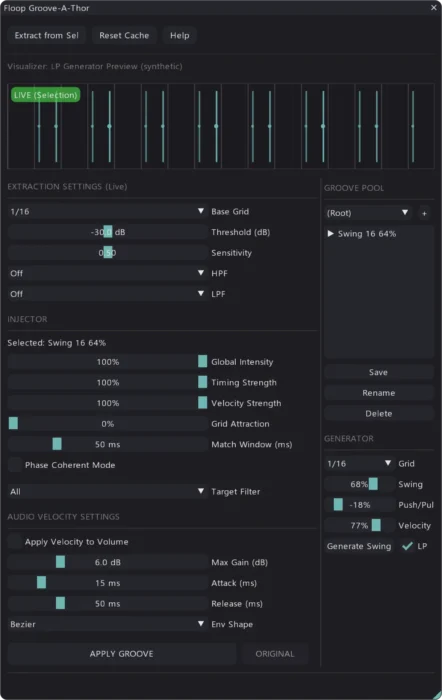
Groove Extraction Tool for REAPER
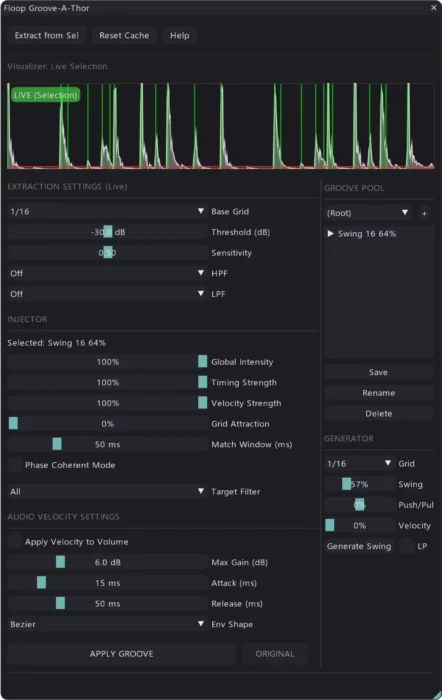
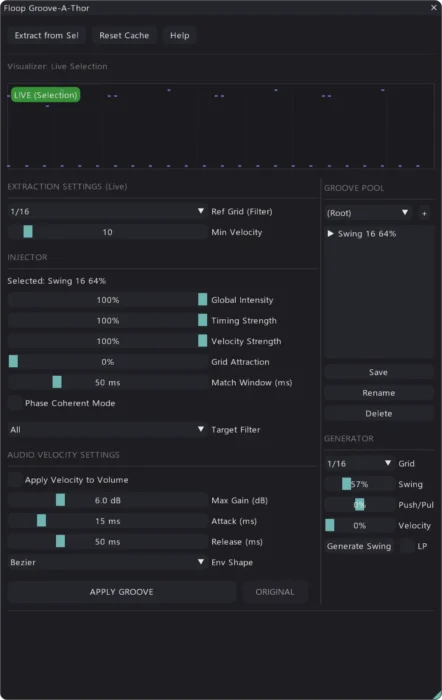
Groove-A-Thor analyzes the rhythmic structure of an item and extracts timing deviations and velocity information.
For audio sources, the script detects transients to identify rhythmic events.
For MIDI sources, it reads note start positions.
The script then applies the extracted pattern to other items with adjustable intensity, allowing partial or full groove transfer.
This REAPER groove extraction workflow makes it possible to reuse the rhythmic feel of one performance across different material inside the same project.
Groove Transfer Between Audio and MIDI
Unlike standard quantization tools, Groove-A-Thor works across both audio and MIDI material, allowing groove transfer between different source types.
Typical workflows include:
- applying the groove of a recorded drum loop to MIDI drums
- transferring the MIDI groove to audio percussion
- aligning multiple audio tracks using the same rhythmic feel
- applying grooves generated procedurally inside the script
This allows consistent timing across multiple tracks while preserving the original groove feel.
Note: For real-time groove creation and looping workflows, see Floopa Station.
Visualizer and Groove Library
The visualizer helps you inspect groove timing before applying it, making it easier to fine-tune groove transfer between items.
Main components include:
LIVE mode – shows the rhythm of the currently selected item
LOCKED mode – displays the stored groove pattern
Groove Library – lets you save and organize grooves in banks
Procedural Groove Generator – creates synthetic swing patterns without analysis
The script stores grooves as .gat files so you can reuse them across sessions.
Requirements
To run the script, you need:
REAPER 7.6x or later
ReaImGui – ReaScript binding for Dear ImGui
You can install through ReaPack.
Installation
The easiest way to install the script is through ReaPack.
- Open REAPER
- Go to Extensions → ReaPack → Import Repositories…
- Add the Floop repository
- Open Extensions → ReaPack → Browse Packages
- Search for “Floop Groove-A-Thor”
- Install and Apply
- Advanced users can manually install the plugin from the GitHub Release page.
Groove-A-Thor Frequently Asked Questions (FAQ)
What does the REAPER groove extraction script do?
Floop Groove-A-Thor extracts rhythmic timing and velocity information from an audio or MIDI item and stores it as a groove pattern.
You can then apply that groove to other audio or MIDI items to transfer the rhythmic feel of the original performance.
Can Groove-A-Thor transfer groove between audio and MIDI?
Yes. The script works across different item types:
- Audio → MIDI
- MIDI → Audio
- Audio → Audio
- MIDI → MIDI
You can reuse grooves from drum loops, MIDI performances, or generated patterns across different tracks.
Can I control how strong the groove transfer is?
Yes, intensity control.
How does groove extraction work with audio items?
When analyzing audio, the script detects transients to determine rhythmic events.
It compares those transient positions with the project grid and calculates the timing offsets that define the groove pattern.
Does the script change audio timing destructively?
No. Groove-A-Thor uses REAPER’s non-destructive editing system.
You can undo any groove application using the standard Undo function.
What is the Groove Library?
The Groove Library allows you to save extracted grooves as preset files.
You can organize grooves in banks and reuse them in different REAPER projects.
Can I generate grooves without analyzing audio?
Yes. Groove-A-Thor includes a procedural groove generator that can create synthetic swing patterns based on grid resolution and swing parameters.
The project is hosted on GitHub, where the source code and manual installation files are maintained.